VBA Environment – VBE
Share: Facebook | Twitter | Whatsapp | Linkedin Visits: 924
Introduction:
VBA Environment we also refer as VBE. You can goto Developr tab in the ribbon and Click on the Visual Basic button to go to the VBE or simply press ‘Alt+F11’ to go to the VBE.
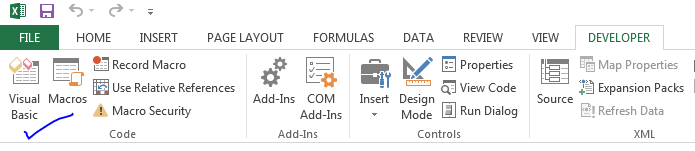
VBA Environment – VBE:
If you press ‘Alt+F11 you can see the following window, this called VBA Editor or VBA Integrated Development Environment.
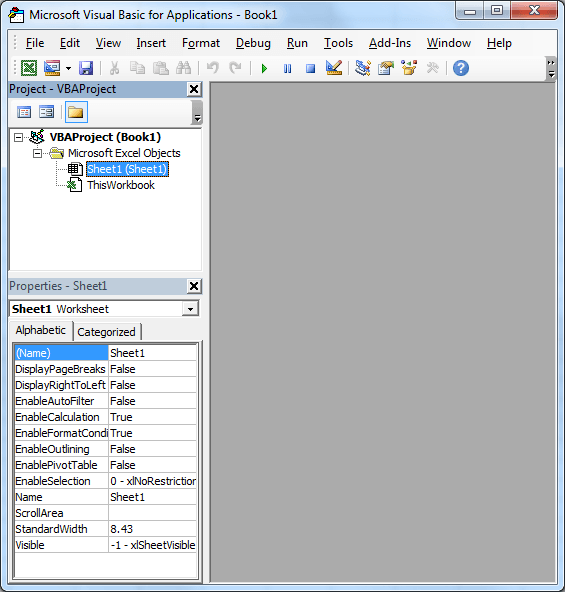
VBA Integrated Development Environment: VBA Editor, Project Explorer, Properties Window
On top you can see the menu bar, Left side you can observe Project Explorer where you can see the all available module in the project and Properties Window where you can see the properties of the selected module in the project explorer or selected object in the Module .
On right side you can see a blank screen, where you will see the the code modules. Go to Menu bar and Select ‘Module’ from the Insert Menu, it will create a white screen/ editor where you can write VBA Macros.
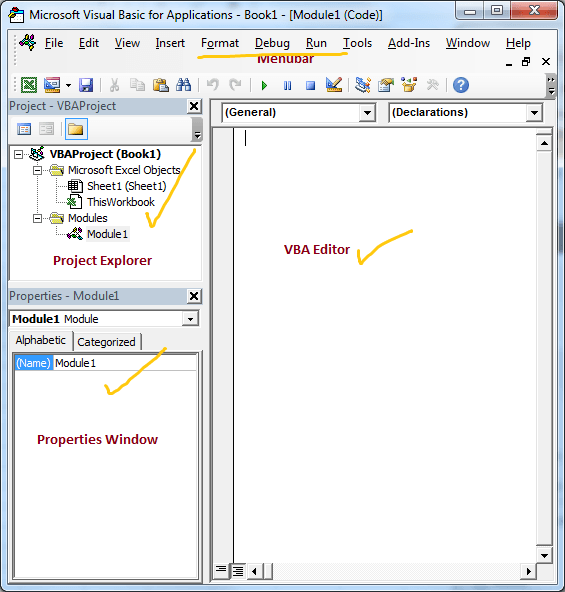
You can arrange the windows where ever you want in the VBE, by default it looks like in the above screen-shot:
- Top most on is the Menu bar where you can choose to inset modules,procedures,reference, edit commands and many more options.
- Right big screen is the VBA Editor where you can write your VBA programs
- On left pane, you can see the Project Explorer where you can see all your modules, classes and forms. You can double click on any objects to write the code in that particular module.
- On left pane, at bottom you can see the properties window where you can see or change the properties of the selected object
- There are many other windows like Immediate Window (it helps to check or debug your programming variables or expressions), Watch Window will help you to see the assigned or calculated values of your variables. You can also see the properties of Objects using in your procedures
We will see more on VBE in the advanced tutorials…