Share: Facebook | Twitter | Whatsapp | Linkedin Visits: 1103
We can pass the arguments in two different ways:
1. By Value (ByVal): We will pass the actual value to the arguments
2. By Reference (ByRef): We will pass the reference (address, pointers in other language) to the arguments
ByRef is default passing argument type in VBA. This means, if you are not specifying any type of the argument it will consider it as ByRef type. However, it is always a good practice to specify the ByRef even if it is not mandatory.
Sub ProcedureName(Arguments)
   ***Statements…
End Sub


Function FunctionName(Arguments) As DataType
   ***Statements…
Function Sub
Function fnSum(ByVal intVal1 As Integer, ByVal intVal2 As Integer) As Long
    fnSum = intVal1 + intVal2
End Function
Sub sbMultiplyValues(ByVal intVal1 As Integer, ByVal intVal2 As Integer)
    MsgBox intVal1 * intVal2
End Sub
Sub sbAddValues()
    MsgBox fnSum(200, 300) ‘Here 200 and 300 are the parameters passing to the function (fnSum)
End Sub
Sub sbCallMultiplyValues()
   Call sbMultiplyValues(200, 300)
End Sub
Function fnSumA(ByVal intVal1 As Integer, ByVal intVal2 As Integer, ByVal intVal3 As Integer) As Long
    fnSumA = fnSum(200, 300) + intVal3
End Function
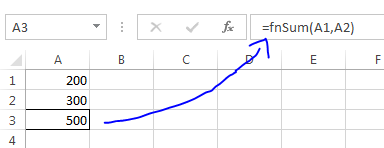
You call the user defined functions as similar to the built-in excel function. The following picture shows how to call a user defined function to add to add two integers: